
GAPPS is not a custom ROM. It means “Google Applications” and usually includes Play Store, Gmail, Google Calendar, and more. If you have some of these applications, then you already have some GAPPS. Most users will only need to install GAPPS if they have installed a custom ROM that did not have GAPPS included.
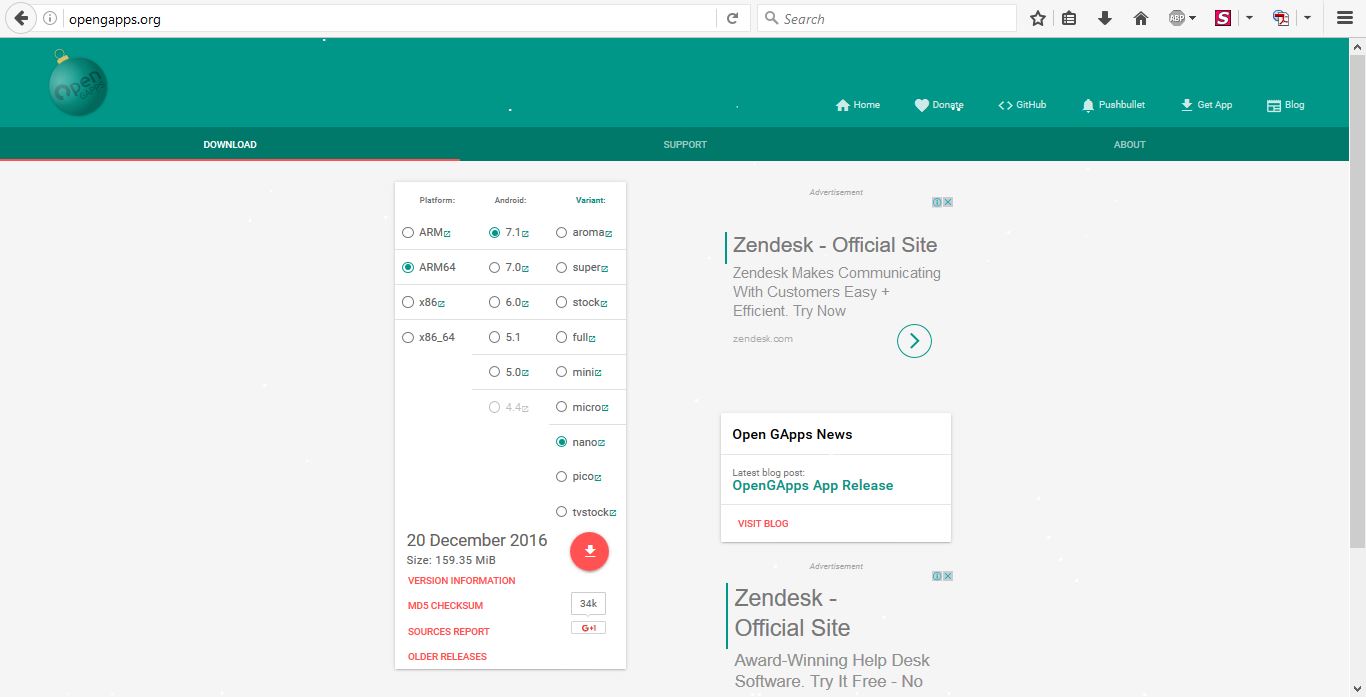
- Select on the Link for Open GAPPS- http://opengapps.org/
- Before downloading you should understand your current CPU and its support in this case.
- There are two things you need to check out, Platform and Android version
- Platform is your CPU type – ARM is 32-bit CPU, ARM64 are 64-bit CPU
- X86 and X86_64 is Intel Processor for 32-bit and 64-bit
Android Version – you will need to check out whether which custom ROM you are downloading from that you will to verify yourself for which Android Version are you going to install on your device.
Under Variant there are many options to choose it’s up to you to choose which GAPPS to Install. My preference is Nano which only Play store and GAPPS functionality is present.